Devices
Within a production you can have multiple devices - realms, to divide your assets into groups and to intelligently manage media files within your production environment. Devices are an abstract way of assigning metadata and system logic to a directory path. Any directory that is available to the host system (i.e. local folders, network folders, mounted external drives) can be used as a device.
In medialoopster devices are key workflow components and also provide are more user friendly view on the filesystem structure. It is recommended to have only one device per path and device paths not to be included in one another (no nesting of devices).
Options
Name | Required | Description |
|---|---|---|
| Name | Yes | Internal name of device. Should be unique. |
| Display Name | Yes | Device name visible to users in browser interface. |
| Path | Yes | Full path to device folder, as seen by medialoopster. Should be unique and not included in other device paths. Never forget the trailing "/" for paths! It is important for path inclusion comparisons. |
| Is internal | Yes | Boolean value indicating that the device is managed by medialoopster. All devices must be internal, with a few exceptions, such as devices for archives. Default is |
| Is archive | No | Boolean value indicating if the device stores archives. Default is |
| Site | No | A reference to the associated site. To view assets in the browser it is not necessary to set the device's site, as the device's production a has already a site associated. It is however necessary to set the device's site for asset transfers; in this case, for consistency, the device's site should be the same as the site of the device's production. |
| Autoshot detection | No | Boolean value indicating that at uploading videos on this device, the shots will be automatically detected. Default is |
| Transcoding profile | No | Choose a transcoding profile for this field if you'd like to have automatic transcoding when creating new assets. The same effect happens if none is selected here, but one is set by default in the transcoding profile administration interface. |
| Passthrough profiles | No | A list of media formats that are exempted from transcoding, such that the media file can pass directly through to be stored in the device without being transcoded. |
| Allow direct writing | No | Boolean value indicating if:
|
| Write permission groups | No | At transferring an asset from a device to this device, the user issuing the transfer request should be part of a group that is in this device's |
| Receive xml meta | No | Boolean value indicating if to write the assets metadata as a XML file on the device during asset transfer to this device. Default is false. |
| Archive connector | No | A reference to the archive connector to be used for sending to archive assets from this device. |
| Yes | The transfer protocol to the device:
Note: The SMB protocol setting is deprecated. Use Copy instead (requires SMB share mounted in host OS). | |
| .Anonymous | No | Field necessary for the FTP protocol. |
| Server | No | Field necessary for the FTP protocol. |
| User name | No | Field necessary for the FTP protocol. |
| Password | No | Field necessary for the FTP protocol. |
Device filter
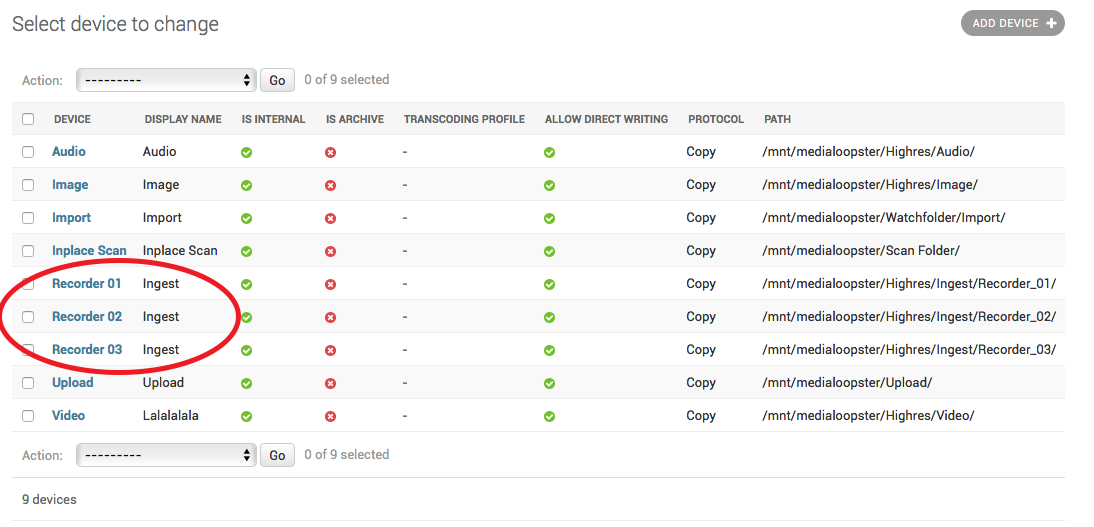
Devices can share a common display name field, which allows them to be grouped together in the device admin page:
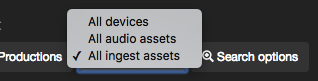
Moreover, if you overwrite the settings.DEVICE_FILTER in custom.py, the users can filter in the browser interface the assets belonging to only the devices with that "display name":
DEVICE_FILTER = [
    {
        "display_name": "All audio assets",
        "value_name": "Audio"
    },
    {
        "display_name": "All ingest assets",
        "value_name": "Ingest"
    }
]
Where:
- display_name: the text that will be shown in the browser as device filter option
- value_name: the value of the device "display name "field
In this case, after an Elasticsearch reindex and restart of the frontend Docker node, the user will be able to select between :