Asset sharing
Users with the share_production_asset permission can share assets via the browser user interface to another production where they have read production membership. The target production's site should be within the source production's "Direct attached site" or "Network attached site".
When the user shares the asset (more details in the user handbook), a production content is automatically created with status TRANSFERRING and the high resolution essence file is copied on a target device of the target production, depending on the initial setup via the administration interface:
- Asynchronous share via export device:
- Set in the source production a target production with an intermediate target device.
- On "Share" click, the high resolution essence file is copied on the mentioned device as
_share.<production_content_id>.<file_name.extension>. - Add and enable a watchfolder on that device path to move the high resolution copy to the final target audio/image/video asset device, and to generate a proxy locally.
- Direct share:
- No target production and target device is set in the source production.
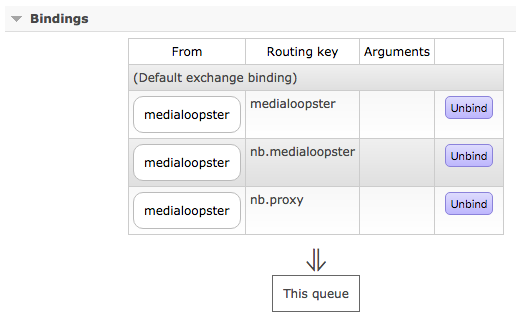
- In order to allow target proxy generation of the shared asset, access your local RabbitMQ cluster admin page at the queue medialoopster
http://<main-ml-page>:15672/#/queues/%2F/medialoopsterand add a new binding:- "from exchange":
medialoopster - "routing key":
<target_production_codename>.proxyfor examplenb.proxy.
- "from exchange":
- On "Share" click, the high resolution essence file will be directly copied to the target audio/image/video asset device, and the proxy generated locally.
When the sharing finished correctly, the production content's status is set to AVAILABLE. In case of errors during sharing, the production content is deleted (as described below).
There is no transcoding or shots detection during asset sharing
After an asset is already shared on a target production, it is not possible to share it again on the same target production.
Shared production contents
The shared assets record is automatically created in the administration/management interface and a production content should not be manually added.
To change the date to withdraw from sharing:
- "Management → Shared assets → Actions → Change date to withdraw", provided the manager has the
share_production_assetpermission as well
To withdraw the asset from sharing:
- delete the shared production content in its administration interface
- "Management → Shared assets → Actions → Withdraw", provided the manager has the
share_production_assetpermission as well - on the date to withdraw, the housekeeping will delete the production content.
Any production content delete operates as follows:
- the production content entry gets deleted
- the target high resolution and proxy files get deleted:
- if they don't have the same path as for the source production and
- if in your local RabbitMQ cluster admin page at the queue medialoopster
http://<main-ml-page>:15672/#/queues/%2F/medialoopsteryou added the binding:- "from exchange":
medialoopster - "routing key":
<target_production_codename>.medialoopsterfor examplenb.medialoopster.
- "from exchange":
- The original asset and its files are not affected during the delete.
Options
Name | Required | Description | |
|---|---|---|---|
| Production | Yes | Name of target production. | |
| Shared by | Yes | User who shared the asset. | |
| Date to withdraw | Yes | Date when the production content will get deleted. | |
| Content type: | Yes | The type of the shared asset. | |
| Object id | No | The ID of the asset. | |
| Status | Yes | Status of the sharing:
| |